# Setting up testing for React Apps using jest & react-testing-library
Hello,
I'm back after a long time with another article. I had lot of interviews lined up as I was looking for switching job. Finally, accepted a position as Associate 2 at Pricewaterhouse Coopers.
So as one of the first tasks, I was asked to setup testing for react app that we were building using Jest and React Testing Library. I ran into multiple issues with the setup and could not find quick fixes for my problems. Just documenting what I did so that others don't feel or get stuck.
### Key Points to be noted
- This solution is for projects being bundled with **webpack**
- This article is not for people who are bootstrapping the React App with `create-react-app` (hereby referred in the article as CRA). CRA comes preconfigured with **jest** and **react-testing-library**.
- There are few things in this article which even I don't understand like creating stubs and various parameters in `jest.config.js` file
- You have a basic knowledge of what packages like **babel** & **webpack** do
- You have a react project created using webpack. If not start by cloning using below command
```
git clone -b 01-starter https://github.com/ttahm3d/react-javascript-template.git
```
## Getting started
As is the way with CRA template, most of the react app testing has been moved away from the combo of Jest and Enzyme to Jest and React Testing Library. Most of this due to the fact that enzyme does not support most of the new features of react and the delay in getting apapted to new features.
For someone coming from a Enzyme testing background, there is a complete shift in the testing point-of-view. We test the component for the way it works in React-Testing Library.
## Installation
Jest is a javascript testing framework. It acts as a test runner and provides us methods to interact and assert if the expected results are correct or false.
```
npm install --save-dev jest
```
Let's check if it works by running the tests specified in the [Jest Docs](https://jestjs.io/docs/getting-started)
```
// Sum.js
function Sum(a, b) {
return a + b;
}
export default Sum;
// Sum.test.js
import Sum from './Sum';
test('2 and 2 is 4', () => {
expect(Sum(2, 2)).toBe(4);
});
```
Add the below settings to package.json
```JSON
"scripts": {
...,
"test": "jest",
},
```
Now run `npm run test`.
This test should work as expected. Lets install the other part of testing suite *react-testing-library* and start writing tests for our React components.
```
npm install @testing-library/react @testing-library/jest-dom @testing-library/user-event
```
## Configuration
Before we test React components we need to configure jest and react-testing-library.
Run the command:
```
npx jest --init
```
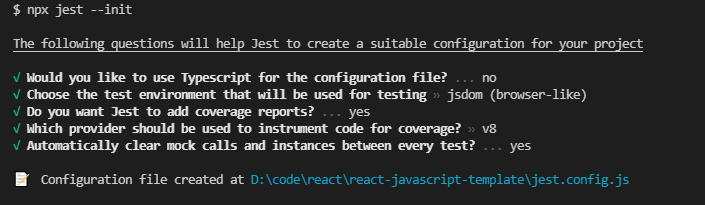
You will be taken through a series of questions in the command line, answer them as per the applicability. For our instance the response is as below in the screenshot. After this is done, a `jest.config.js` file is created which has various parameters that are result of your choices.
## The Problem
Create a new test file `app.test.js` and the below contents
```JSX
import { render, screen } from '@testing-library/react';
import App from './app';
it('should render the app component', () => {
render();
const text = screen.getByText(/React starter/i);
expect(text).toBeInTheDocument();
});
```
Now we see an error with error message on the as below
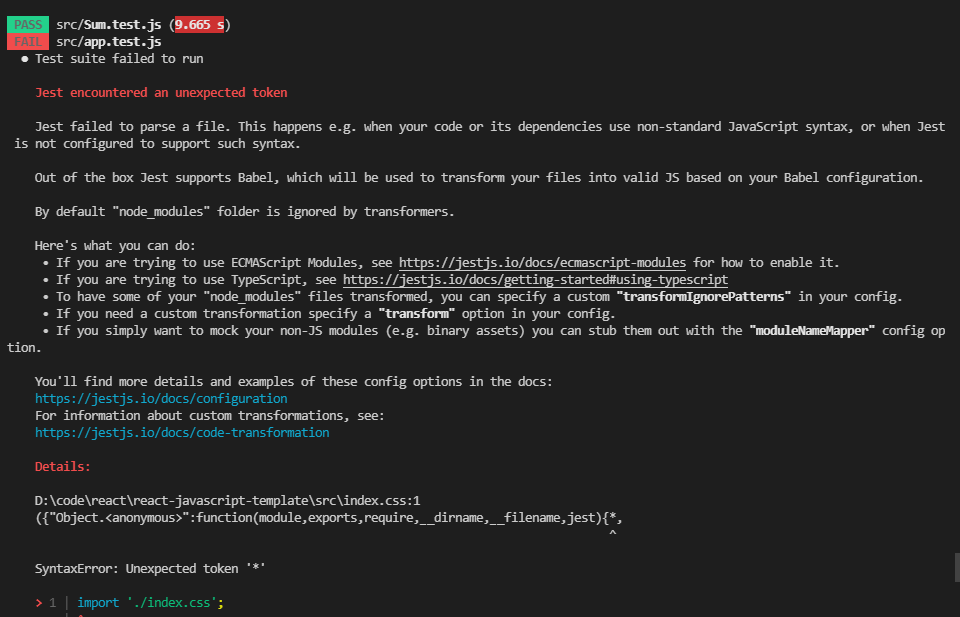
This is because jest cannot parse non Javascript files using babel loader. Files such as images, fonts, css files etc. need to be stubbed as per the jest documentation. We need to use the property called [`moduleNameMapper`](https://jestjs.io/docs/configuration#modulenamemapper-objectstring-string--arraystring) to stub these files.
## Solution
Create a folder named Mocks and create two files `fileMock.js` and `styleMock.js`
Add the below content to respective files
```JS
// fileMock.js
module.exports = "test-file-stub";
// styleMock.js
module.exports = {}
```
Now to the `jest.config.js` add the below content
```JS
module.exports = {
...,
moduleNameMapper: {
"\\.(jpg|jpeg|png|gif|eot|otf|webp|svg|ttf|woff|woff2|mp4|webm|wav|mp3|m4a|aac|oga)$":
"/Mocks/fileMock.js",
"\\.(css)$": "/Mocks/styleMock.js",
},
};
```
There is a new error now which is as below
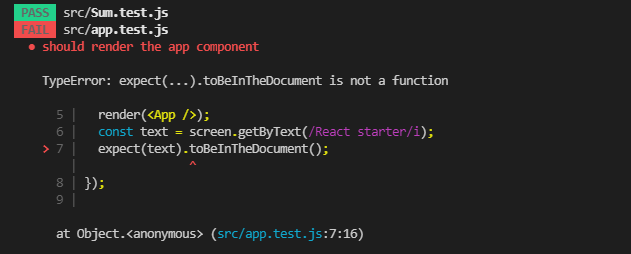
Create a new file `setupTests.js` and add the following content
```
import '@testing-library/jest-dom/extend-expect`
```
and add the below to `jest.config.js`
```
module.exports = {
...,
setupFilesAfterEnv: ['/setupTests.js'],
}
```
What this does it it calls the setupTests.js file before jest runs every `.test` file. Now the tests would run and pass.
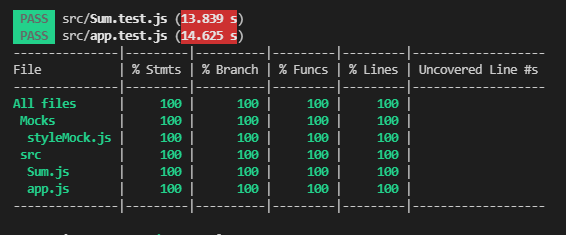
Complete soultion is in this [Git repo](https://github.com/ttahm3d/react-javascript-template)
Thats all for this article. Thanks for reading it through.